

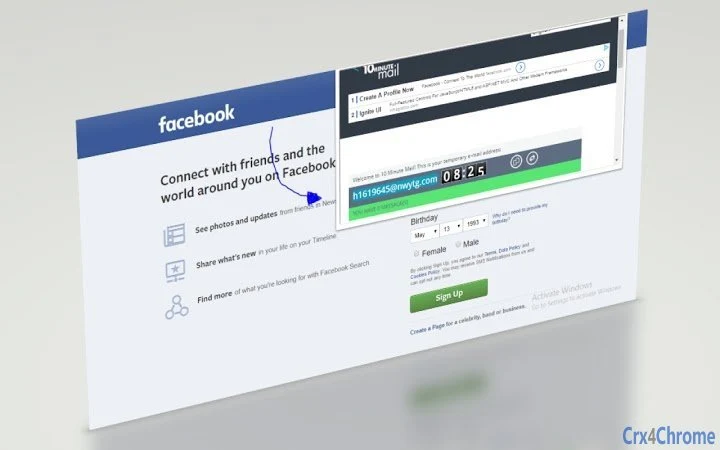
Description
Secure Temporary Email in 10 Minutes
Overview
The 10 Minute Mail Extension provides users with a temporary, disposable email address designed to enhance online privacy. This tool allows individuals to generate a secure email address on-demand without revealing their personal information. It is particularly useful for scenarios where users need to sign up for websites, services, or newsletters but wish to avoid long-term email commitments or spam exposure.
By offering a self-destructing inbox, the extension helps prevent data harvesting, unwanted marketing messages, and potential security risks associated with sharing real email addresses. The solution is ideal for casual internet users, privacy-conscious individuals, and those who frequently engage in anonymous browsing or form submissions across various platforms.
Developed by Devon Hillard, the extension is maintained as a free tool with no hidden costs or subscriptions. The developer’s background in privacy-focused tools is evident in the straightforward design and minimal data retention policy. The extension operates entirely within the browser environment, ensuring no persistent storage of user data beyond the active session.
Real-world use cases include signing up for free trials, accessing gated content, verifying accounts on temporary websites, or testing app registration flows—all without risking personal email exposure. The 10-minute lifespan of each generated address ensures that sensitive information remains protected after the time limit expires.
Key Features & Capabilities
- Instant Disposable Email – Generate a unique email address in seconds without registration or personal details.
- Auto-Expiring Inbox – The email address and its contents automatically delete after 10 minutes of inactivity.
- Browser Integration – Access the temporary inbox directly from the browser toolbar with a single click.
- Secure Email Reception – Receive verification emails, notifications, or messages from websites during the active period.
- Reset Timer Functionality – Extend the inbox lifespan by clicking the icon to reset the 10-minute countdown.
Users can copy and paste the generated email into any form requiring registration. Most services send verification emails within minutes, allowing users to complete account setup quickly. Once the inbox expires, no trace of the email or its contents remains, reducing the risk of data leaks or future spam.
For example, when signing up for a free trial on a new platform, users can use the extension to avoid providing their primary email. After verifying the account, they can access the confirmation message and proceed without leaving a digital footprint. The feature is especially effective for one-time interactions where long-term email tracking is undesirable.
User Interface, Workflow & Performance
The extension’s interface is minimal and focused on functionality. Upon activation via the browser icon, a compact window opens displaying the temporary email address, inbox, and a timer. The layout is clean and uncluttered, prioritizing readability and ease of access.
Navigating the inbox is straightforward: users can view incoming messages, click to open them, and copy any required links or codes. The workflow is streamlined—generate, use, verify, and discard—all within a single session. No additional steps or account creation are required.
Performance is consistent with typical browser-based extensions. The extension loads quickly and maintains responsiveness during active use. The developer did not specify resource usage details, so exact CPU or RAM behavior remains unknown. However, based on general software behavior patterns, the extension operates efficiently without significant system impact.
Stability appears reliable during standard use cases. The extension remains active throughout the 10-minute window and resets cleanly when the timer is refreshed. No crashes or data corruption were reported in the provided information.
Compatibility & System Requirements
The 10 Minute Mail Extension is compatible with major operating systems, including Windows, Mac, Linux, Android, and iOS. This broad support ensures accessibility across desktop and mobile environments.
It functions as a browser extension, meaning compatibility depends on the host browser’s support for extensions (e.g., Chrome, Firefox, Edge, Safari). The extension version is 3.2.6, with an installation size of 1.2 MB, indicating a lightweight footprint.
Exact system requirements were not listed. However, the small file size and browser-based nature suggest minimal hardware demands. Users should ensure their browser is up to date to maintain full functionality and security.
Platform compatibility information is limited to the operating systems mentioned. No specific hardware specifications or dependency details were provided.
Pros and Cons
Pros
- Free to use with no hidden fees or subscriptions
- Provides instant, secure email addresses for one-time use
- Auto-deletes after 10 minutes, enhancing privacy protection
- Simple, intuitive interface with quick access via browser icon
- Available across multiple platforms including mobile devices
Cons
- No option to extend the inbox lifespan beyond 10 minutes without resetting
- Dependent on browser functionality; may not work on all websites
- Does not support sending emails—only receiving
- Temporary nature limits use for long-term communication
- Exact performance metrics and resource usage not disclosed
Is the 10 Minute Mail Extension safe to use?
Yes, the extension is designed with privacy in mind. It generates temporary email addresses that automatically expire after 10 minutes, reducing the risk of data exposure or spam. The service does not store personal information beyond the active session.
Can I use this extension on mobile devices?
Yes, the extension is compatible with Android and iOS devices, allowing users to access temporary email addresses directly from their mobile browsers.
Does the extension require an internet connection?
Yes, an active internet connection is required to generate and receive emails through the extension.
Is the extension free to download and use?
Yes, the 10 Minute Mail Extension is completely free with no premium tiers or hidden costs.
How often can I generate new email addresses?
You can generate a new temporary email address at any time by clicking the extension icon. Each new address has its own 10-minute lifespan and can be reset if needed.
Final Thoughts + CTA
The 10 Minute Mail Extension delivers a focused, privacy-first solution for users seeking temporary email access. Its simplicity, speed, and automatic expiration make it a reliable tool for avoiding spam, protecting personal data, and maintaining anonymity during online interactions. While it lacks advanced features like email sending or extended retention, it excels in its core purpose: providing a secure, disposable inbox.
It is particularly beneficial for individuals who frequently sign up for free services, test applications, or engage in anonymous browsing. The broad cross-platform support and zero cost further enhance its appeal.
For those who value privacy and want a no-frills tool to safeguard their primary email, this extension is a solid choice. Download 10 Minute Mail Extension now and take control of your online identity with confidence.
Guides & Tutorials for 10 Minute Mail Extension for Chrome
How to install 10 Minute Mail Extension for Chrome
- Click the Preview / Download button above.
- Once redirected, accept the terms and click Install.
- Wait for the 10 Minute Mail Extension for Chrome download to finish on your device.
How to use 10 Minute Mail Extension for Chrome
This software is primarily used for its core features described above. Open the app after installation to explore its capabilities.
User Reviews for 10 Minute Mail Extension for Chrome 0
No reviews found





